Behavioural VM Detection
In the modern landscape of malware development, relying on static signatures like hunting for vboxguest.sys or querying MAC addresses is bound to fail. Hypervisors are highly configurable, and any competent analyst can spoof a static artifact in seconds.In this post, we will build a custom behavioral timing attack. We will exploit the fundamental physics of CPU emulation, bypass active RDTSC timestamp spoofing using a technique I call System Inertia, and mathematically prove whether our payload is running on bare metal or inside a hostile sandbox. The code for the same can be found at YetAnotherVmDetectionLib.
Setup
Everything which we are going to talk about is done on latest Windows and defender versions, which at the time of writing this blog are -
Windows OS
- Edition: Windows 11 Pro
- Version:
25H2 - OS Build:
26200.7840
Defender Engine
- Client:
4.18.26010.5 - Engine:
1.1.26010.1 - AV / AS:
1.445.222.0
Hardened VM Environment
✓ hypervisor.cpuid.v0 = "FALSE"
✓ monitor_control.disable_rdtsc = "TRUE"
✓ monitor_control.restrict_backdoor = "TRUE"
This is not just any project built to run in a vulnerable environment with security features turned off. This is some serious work and hence made just for education and research purposes.
Traditional VM Detection
Traditional Virtual Machine detection methods work on the fact that virtualization software leaves behind recognizable environmental artifacts within the guest operating system. Hypervisors like VMware, VirtualBox, Hyper-V, and QEMU are designed for functionality and ease of use, not stealth. By default, they openly announce their presence to the guest OS to enable integration features like shared clipboards, dynamic screen resizing, and optimized drivers.
Security researchers, malware analysts, and malware authors, look for these artifacts to check if an environment is virtualized. Lets look at some static artifacts and understand why they are inherently fragile for robust detection.
MAC Addresses
Network interface cards have a MAC address where the first three bytes (the Organizationally Unique Identifier) indicate the manufacturer. By default, a VM will have a MAC address assigned to its hypervisor, such as 00:05:69 for VMware or 08:00:27 for VirtualBox.
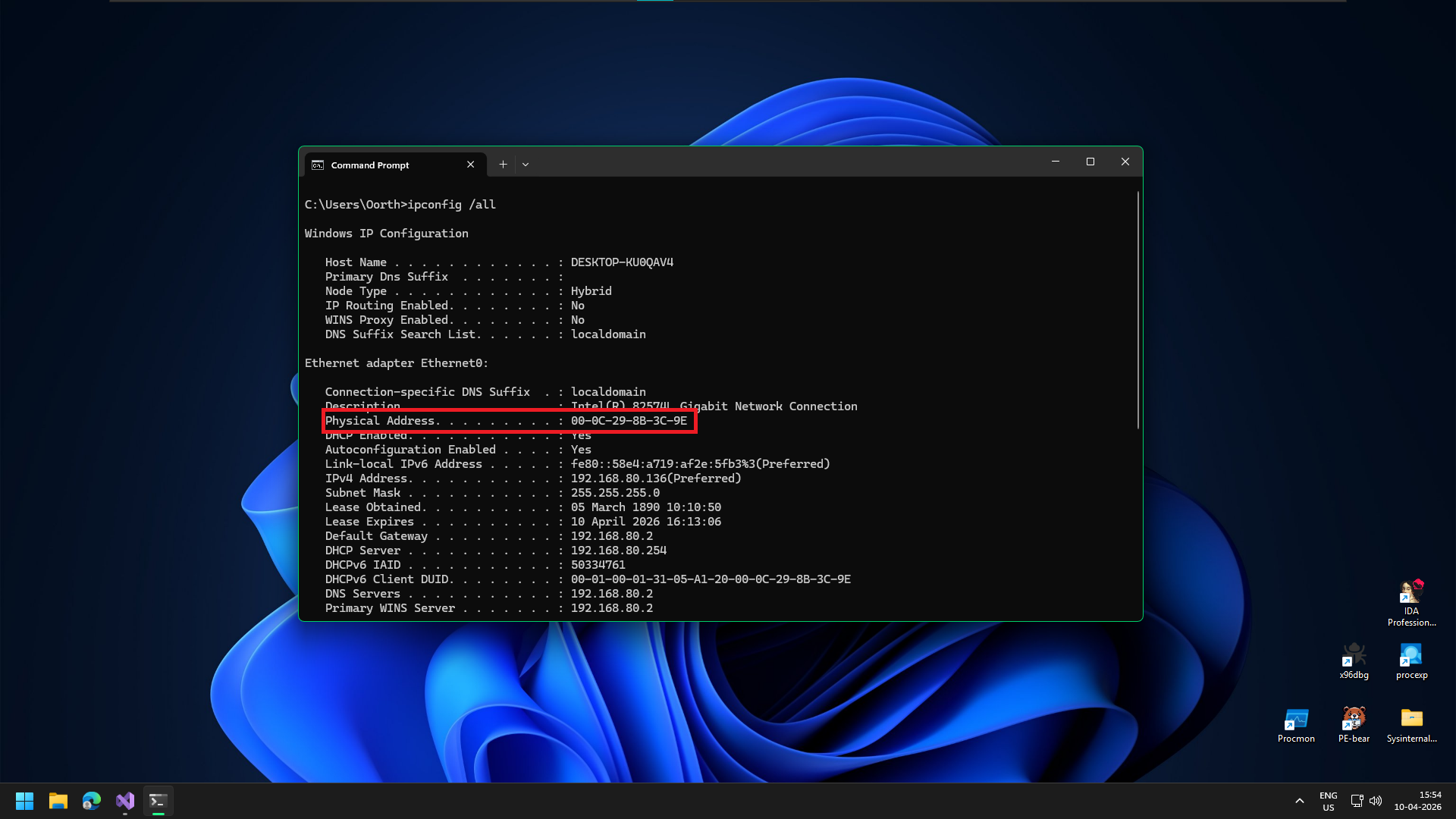
MAC address of a VMware virtual machine
Windows Registry Keys
The guest OS stores hardware configurations in the registry. Navigating to HKLM\HARDWARE\Description\System\BIOS or enumerating device enumerators in HKLM\SYSTEM\CurrentControlSet\Enum will frequently reveal strings like "VMware", "VBOX", "QEMU", or "Virtual HD".
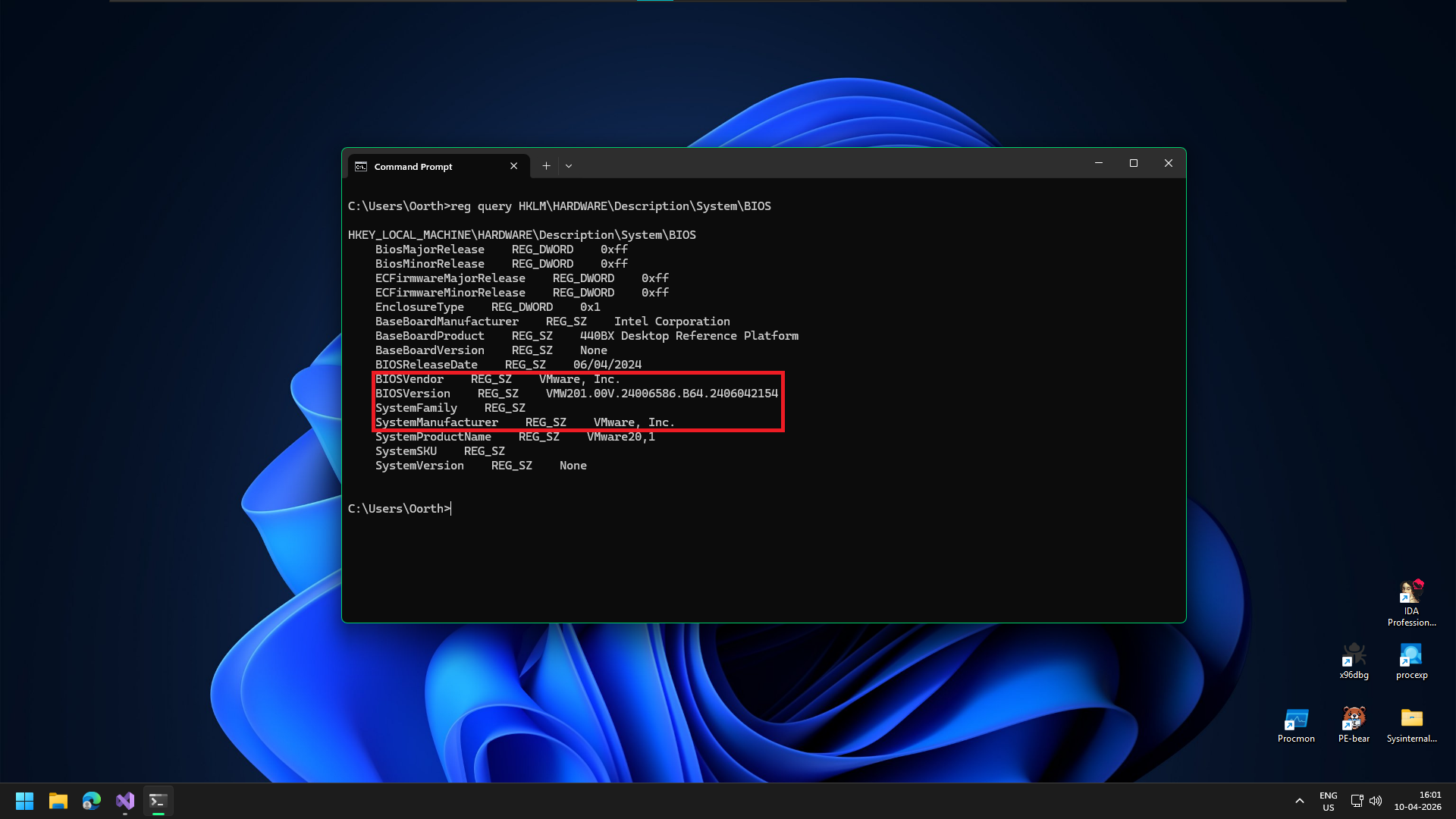
Indicators in the registry
Drivers and Processes
To enable features like shared clipboards or dynamic screen resizing, hypervisors install specific toolset. The presence of files like vboxguest.sys (VirtualBox), vmtoolsd.exe (VMware), or vmbus.sys (Hyper-V) is a dead giveaway.
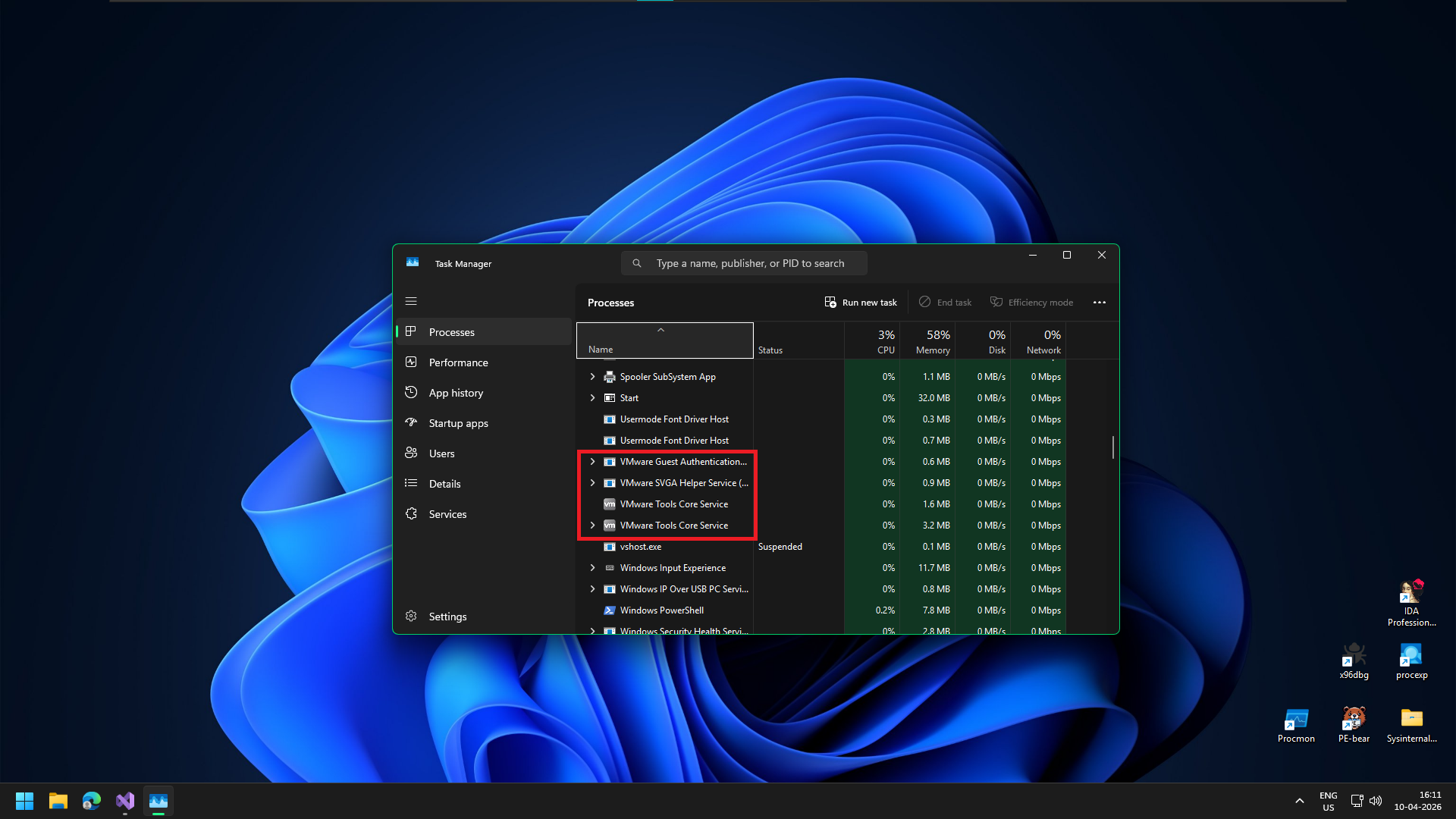
Indicators in the registry
These processes can be seen even from the basic task manager.
CPUID Instructions
When software executes the CPUID instruction to query processor features, hypervisors often intercept this and return their own signature. Instead of just "GenuineIntel" or "AuthenticAMD", the system might return "VMwareVMware" or "KVMKVMKVM". Saving the report from CPU-Z shows us:
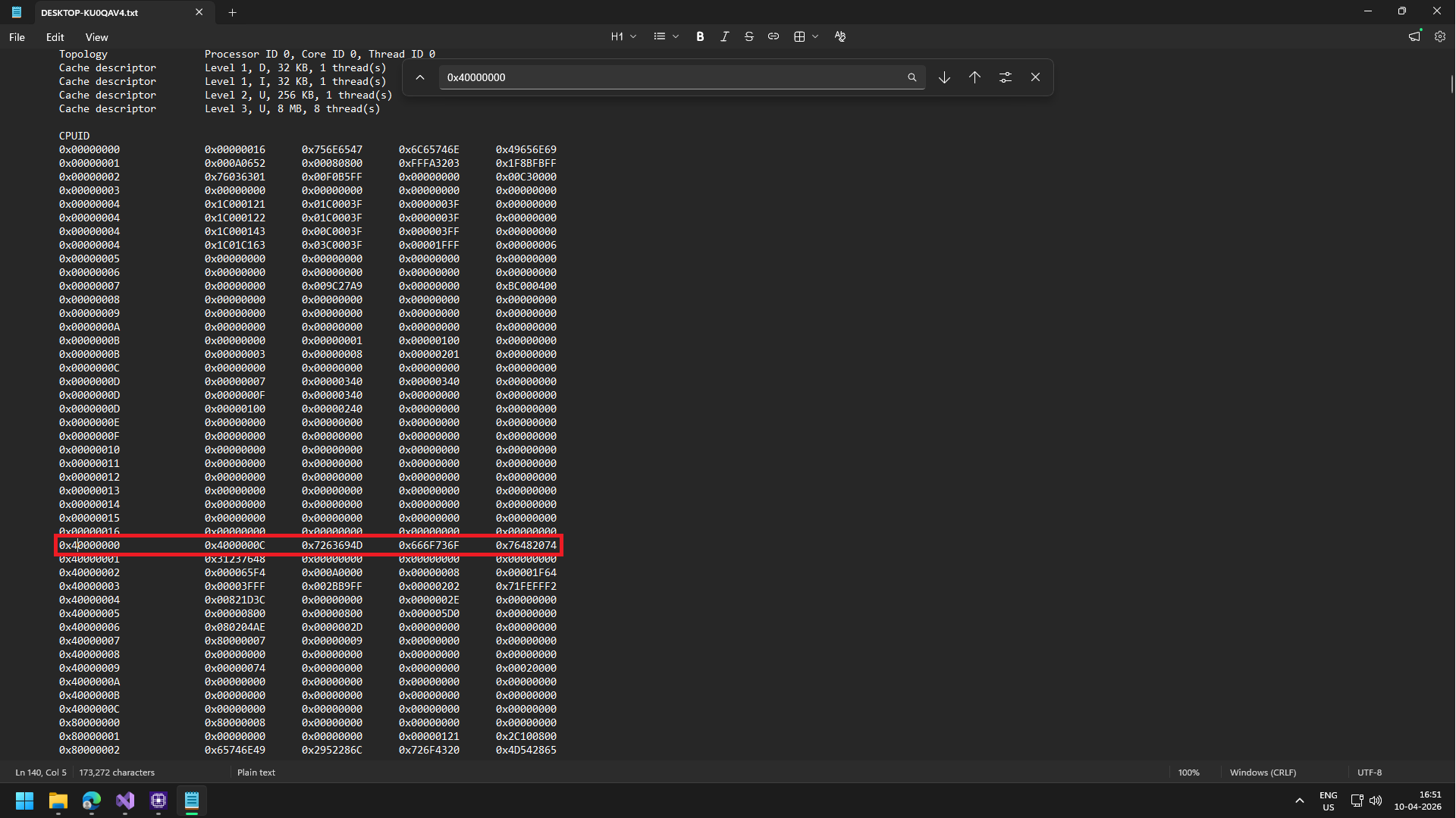
Hypervisor Leaf
The CPUID instruction is divided into "leaves" (pages of information). Real hardware vendor strings live at leaf 0x00000000. Hypervisor strings always live at leaf 0x40000000. From the leaf we can see 0x7263694D, 0x666F736F, 0x76482074. Because x64 architecture is Little-Endian, the characters are stored backward inside the hexadecimal values.
"Microsoft Hv"
But why Microsoft Hv? When a Windows guest operating system has features like Virtualization Based Security or Core Isolation enabled, it strictly requires a Microsoft Hyper-V environment to manage the secure memory enclaves those features rely on. If VMware actually returned its real "VMwareVMware" signature, Windows wouldn't know how to set up those features, and they would fail to activate.
To solve this, VMware uses what are called "Hyper-V enlightenments." It intercepts the CPUID hardware query (which the image shows happening at leaf 0x40000000). Instead of handing back its own identity, VMware deliberately feeds the exact hexadecimal values for "Microsoft Hv" into the processor's registers.
Evading Traditional VM Checks
The core issue with static detection comes down to a fundamental concept of control and privilege. Because the hypervisor dictates the entire "reality" of the virtual machine, any data resting within that VM can be effortlessly manipulated.
The Illusion of Reality
When a code checks a registry key or queries the CPU, it isn't actually touching physical hardware; it is asking the hypervisor for that information. Because the hypervisor (Ring -1) controls the hardware layer, a malware analyst can simply instruct the hypervisor to lie. The malware has absolutely no point of reference to verify if the data it receives is real or spoofed.
Static detection relies almost entirely on a blacklist approach (e.g., hunting for vboxguest.sys or VMware Virtual IDE Hard Drive). Blacklists are inherently fragile. Hypervisors are highly configurable. For example, in VMware, simply opening the .vmx configuration file in Notepad and changing a few lines completely alters the VM's static footprint, breaking the detection entirely.
Because static markers can be spoofed or renamed by an analyst with ten seconds of free time, we must abandon blacklists. If we truly want to detect a virtualized environment, we need to focus on Behavioral Artifacts.
Behavioral Artifacts
We saw how trivial it is to bypass static VM checks simply by instructing the hypervisor to lie about its identity. However, there is a fundamental truth in computing: You can spoof a name, but you cannot spoof physics.
While a Virtual Machine can easily hide what it is, it cannot fully hide how it behaves.
THE BEHAVIORAL PARADIGM SHIFT
Instead of hunting for fragile blacklist strings like vboxguest.sys, advanced malware looks for architectural side-effects. Because a hypervisor must emulate hardware, manage memory translations, and intercept privileged instructions, it inherently introduces microscopic delays, scheduling quirks, and specific CPU behaviors that simply do not exist on bare-metal hardware.
We are no longer looking for the hypervisor's name; we are looking for its fingerprints.
Calculating System Inertia
The most famous behavioral check in industry is measuring time. If an operation takes 100 CPU cycles on bare metal but 5,000 cycles inside a VM, It a very big give away. And we can use the clock to measure the time taken using the __rdtscp (Read Time-Stamp Counter) instruction.
However, modern hypervisors are smart. They intercept __rdtscp calls and spoof the results, feeding fake timestamps to make the VM look perfectly fast and normal.
To defeat a hypervisor that can manipulate time, we stop measuring raw time. Instead, we measure a ratio between two fundamentally different types of CPU instructions.
An instruction that forces the CPU to pause the guest OS and trap into the Hypervisor (Ring -1) for emulation. This context switch is incredibly expensive and takes thousands of cycles to complete in a VM, but executes instantly on bare metal.
A harmless mathematical instruction that executes entirely within the guest CPU context. It never triggers a VM Exit, meaning it runs at the exact same blinding speed regardless of whether it is in a VM or on bare metal hardware.
Defeating RDTSC Spoofing
If we calculate the ratio of the time it takes to execute the VM Exit trigger divided by the Baseline standard, we get our Inertia Score.
On Bare Metal: Both execute fast.
Low Ratio (e.g., 2.5)
Inside a VM: CPUID forces a massive context switch delay. Math is unaffected.
Huge Ratio (e.g., 150.0)
The Spoofed VM Trap: If the Hypervisor hooks RDTSC to artificially slow down the perceived clock speed (attempting to hide the CPUID delay), it mathematically slows down the perceived time of the Math operation too! The numerator and denominator both scale, meaning the ratio remains massively skewed!
Implementation
To practically calculate the System Inertia ratio in C++, we need to build two isolated benchmarking loops.
- The Heavy Workload: A loop executing the
__cpuidintrinsic to force repeated, expensive VM Exits. - The Baseline Workload: A loop executing raw mathematical operations to measure raw CPU throughput without triggering the hypervisor.
However, before we write a single line of logic, we must secure our execution environment against our own tools.
The Compiler Trap
The code we are about to write is extremely fragile. We are measuring CPU execution time down to the microscopic cycle level. If the compiler decides to "help" us by optimizing our loops or reordering our instructions, our timing calculations will become entirely unreliable.
And if the compiler notices that we are calculating math but never actually using the final result for anything important, its aggressive optimization algorithms will literally delete our Baseline Workload from the final executable.
To prevent this, we must use Compiler Directives to build an optimization "Dead Zone" around our timing logic:
MSVC PRAGMA DIRECTIVES
// Disable all compiler optimizations for the following code
#pragma optimize("", off)

void CalculateSystemInertia()
{
    // ... Our highly sensitive timing loops will go here ...
}

// Re-enable optimizations for the rest of the project
#pragma optimize("", on)
Execution Insight: By wrapping our detection function inside #pragma optimize("", off) and ("", on), we instruct the MSVC compiler to compile our code exactly as written. It guarantees that our mathematical loops will physically execute on the CPU, allowing our RDTSC timestamps to capture a true baseline metric.
The Heavy Workload
We will use __cpuid to cause a VM exit and the code is pretty simple we use __rdtsc() to get timestamps before and after the __cpuid execution. The difference gives us the time taken by the OS, and in a hardened VM this could be spoofed but our approach is resistant to it as discussed earlier.
We do this lots of times and only store the fastest time as there can be some readings which could be very large due to some unlucky hardware interrupts or high IRQL stuff which ate up CPU cycles.
// Measure VM Exit (CPUID)
for(int i = 0; i < 1000; i++)
{
    _mm_lfence();
    t1 = __rdtsc();

    __cpuid(data, 0);

    t2 = __rdtscp(&aux);
    _mm_lfence();

    uint64_t diff = t2 - t1;
    if(diff < min_cpuid) min_cpuid = diff;
}
Modern CPUs are impatient. To maximize performance, they actively look ahead in your code and execute instructions out of order if they think those instructions don't depend on each other. If the CPU decides to execute __cpuid before or simultaneously with __rdtsc, our entire timestamp calculation is ruined.
By deploying _mm_lfence() (Load Fence) as physical barricades around our target instruction, we strictly serialize the CPU pipeline. We force the processor to execute the block synchronously, guaranteeing our T2 - T1 calculation represents the true, unadulterated execution time of __cpuid alone.
The Baseline Workload
Pretty simple, we define a loop which does some basic math and store the fastest time it took and again we wrap the thing with _mm_lfence
volatile uint64_t random_math = 0;
for(int i = 0; i < 10; i++)
{
    _mm_lfence();
    t1 = __rdtsc();

    for(int j = 0; j < 25; j++) random_math = (random_math ^ i) + (j * 3);

    t2 = __rdtscp(&aux);
    _mm_lfence();

    uint64_t diff = t2 - t1;
    if(diff < min_alu) min_alu = diff;
}

// Prevent divide by zero if the CPU is impossibly fast
if(min_alu == 0) min_alu = 1;
Notice the declaration: volatile uint64_t random_math = 0;
If we simply defined this as a standard uint64_t, the C++ compiler's static analysis would look at our code and realize that we are performing thousands of mathematical operations but never actually using or printing the final result. To be "helpful," the compiler would aggressively optimize our program by completely deleting the math loop.
By flagging the variable as volatile, we explicitly instruct the compiler: "Do not touch this. Assume this variable can change unexpectedly outside the scope of this program, and physically execute every single read and write to it." This guarantees our baseline benchmark loop actually runs on the CPU.
The Ratio
And we are done. We take our two isolated benchmarks and execute the final division to calculate our System Inertia Score.
// Calculate the final Ratio
return min_cpuid / min_alu;
EXPECTED EXECUTION RATIOS
~200 CPUID / ~50 ALU
~2000 CPUID / ~50 ALU
By mathematically dividing the expensive VM Exit cost by a completely stable mathematical baseline, we create a 10x multiplier gap. The hypervisor can no longer trick us by spoofing the raw timestamp clock, because slowing the clock stretches the ALU baseline simultaneously!
Results
To prove how resilient System Inertia is against hypervisor spoofing, I tested this payload inside a Windows 11 VMware instance. I specifically modified the .vmx configuration file to include monitor_control.disable_rdtsc = "TRUE". This flag instructs VMware to aggressively hook and spoof RDTSC instructions to defeat malware timing attacks.
Let's look at the actual output:
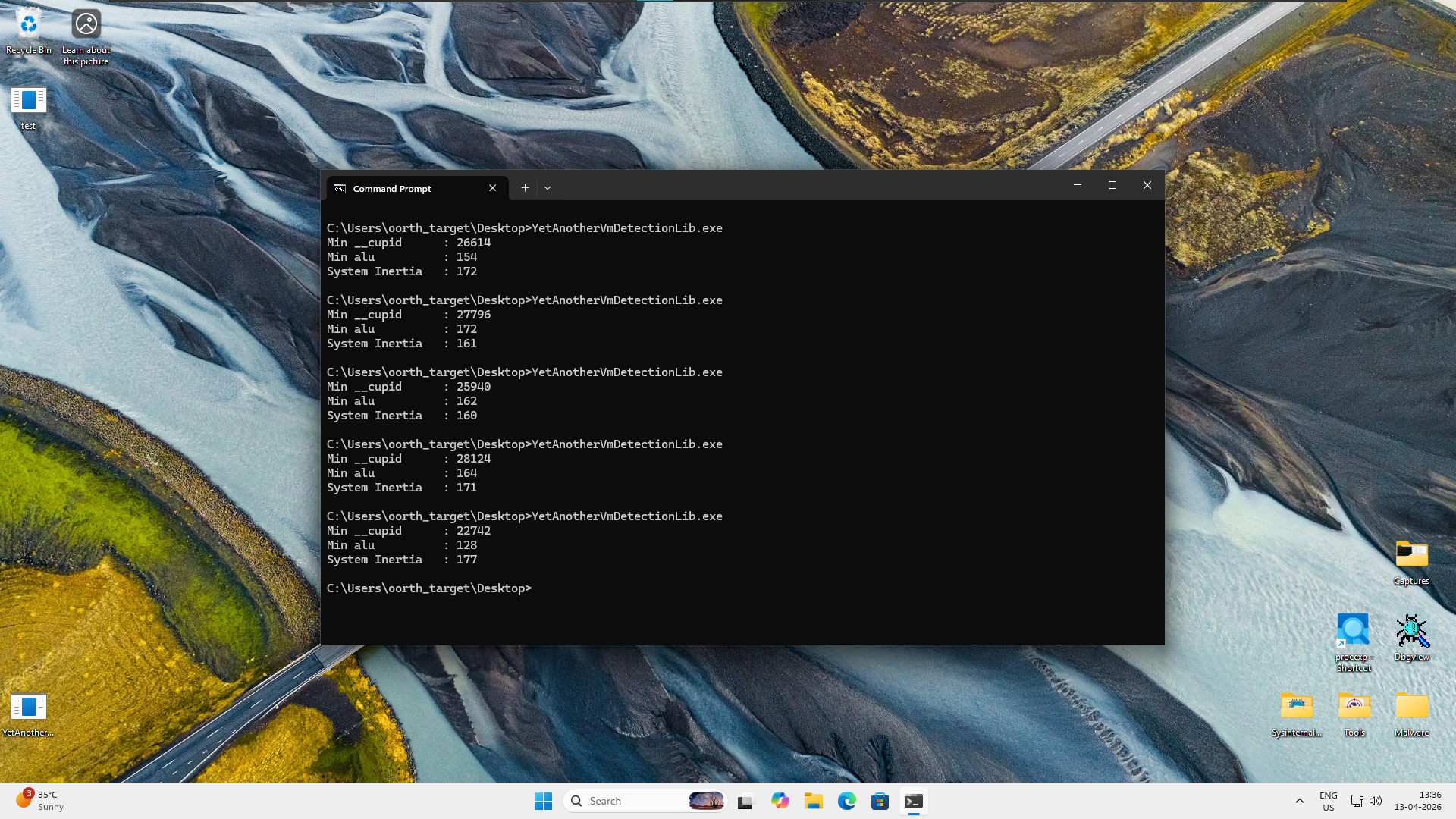
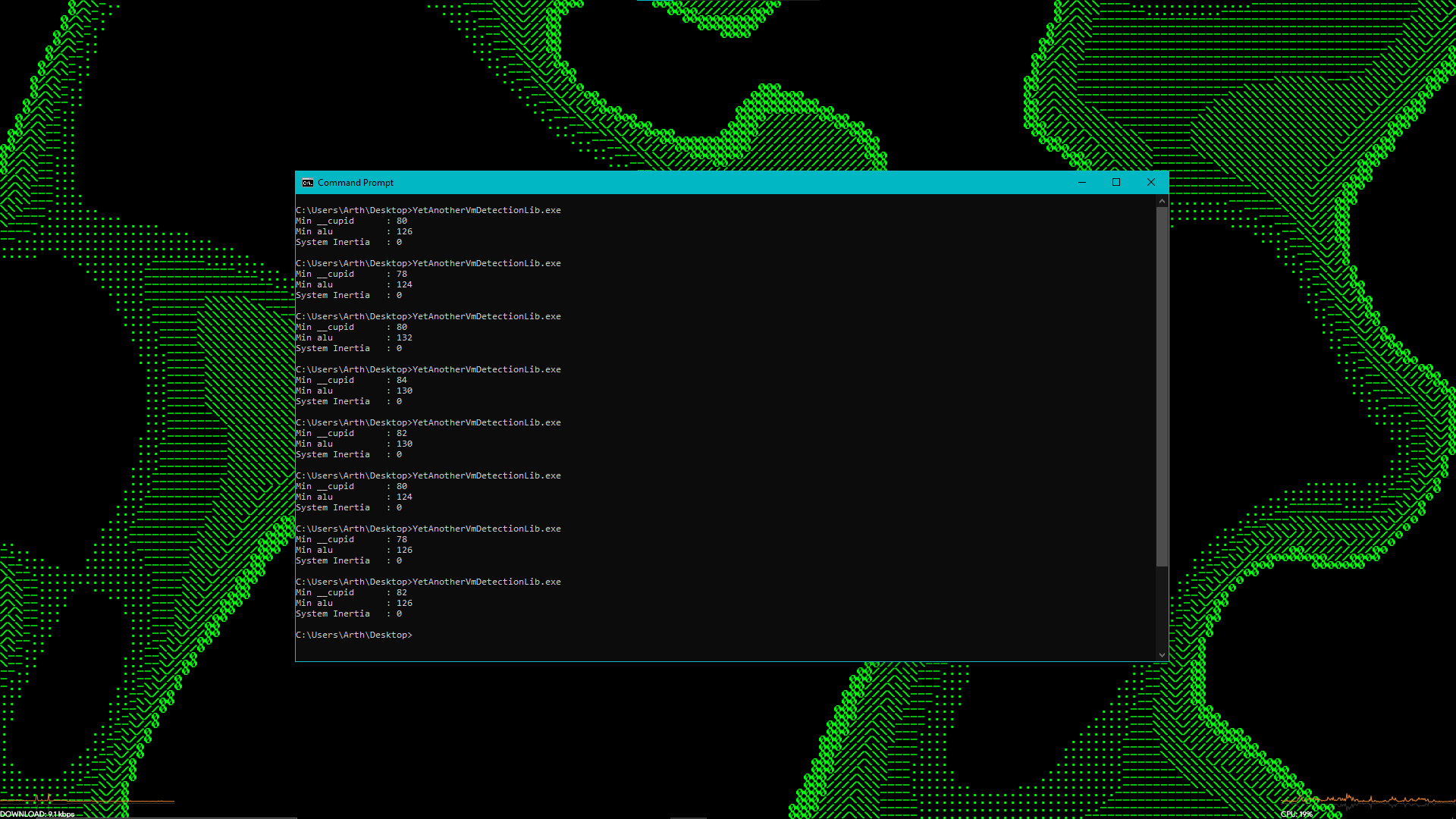
The results are even better than expected. Despite VMware actively attempting to lie about the CPU cycle timestamps, the ratio method catches the emulation delay perfectly. We are seeing Inertia ratios peaking around 170 inside the VM, while actual physical hardware renders ratios close to 0 due to the blinding speed of bare metal CPUID instructions.
The mathematical difference is simply too massive for any hypervisor to successfully mask. We now have a robust, highly reliable behavioral heuristic to detect analysis environments.